How to Check an Existing Account and Usage History After a Global Platform Ends Service in a Specific Country
Finding the Official Shutdown Notice First
When a global platform ends service in Korea, the main app, account page, data-export tool, and billing system may not all close at the same time. A user may lose access to the service while still being able to download personal data, check transactions, or request a refund through another channel.
The first priority is therefore not simply logging in. You need to confirm what is ending, record every deadline, and save account history, payment evidence, and personal content separately.
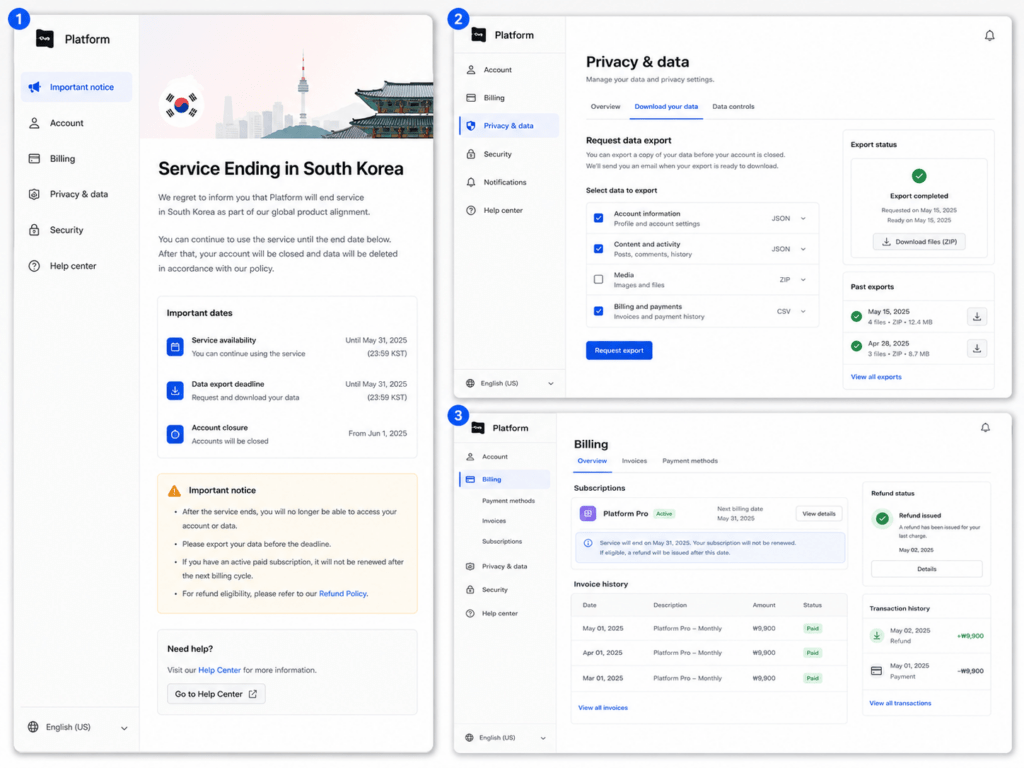
Confirm What Is Ending and Record Every Deadline
Begin with the platform’s official Korean notice, help center, registered email messages, and global support page. Do not rely only on news reports, community posts, or screenshots shared by other users.
A shutdown notice may refer to several different changes:
- New subscriptions are no longer accepted
- Korean payment methods stop working
- The local app or website becomes unavailable
- Streaming, posting, or purchasing ends
- Existing accounts remain accessible only for data export
- Personal information is deleted after a separate retention period
Record each relevant date instead of treating the shutdown as one event.
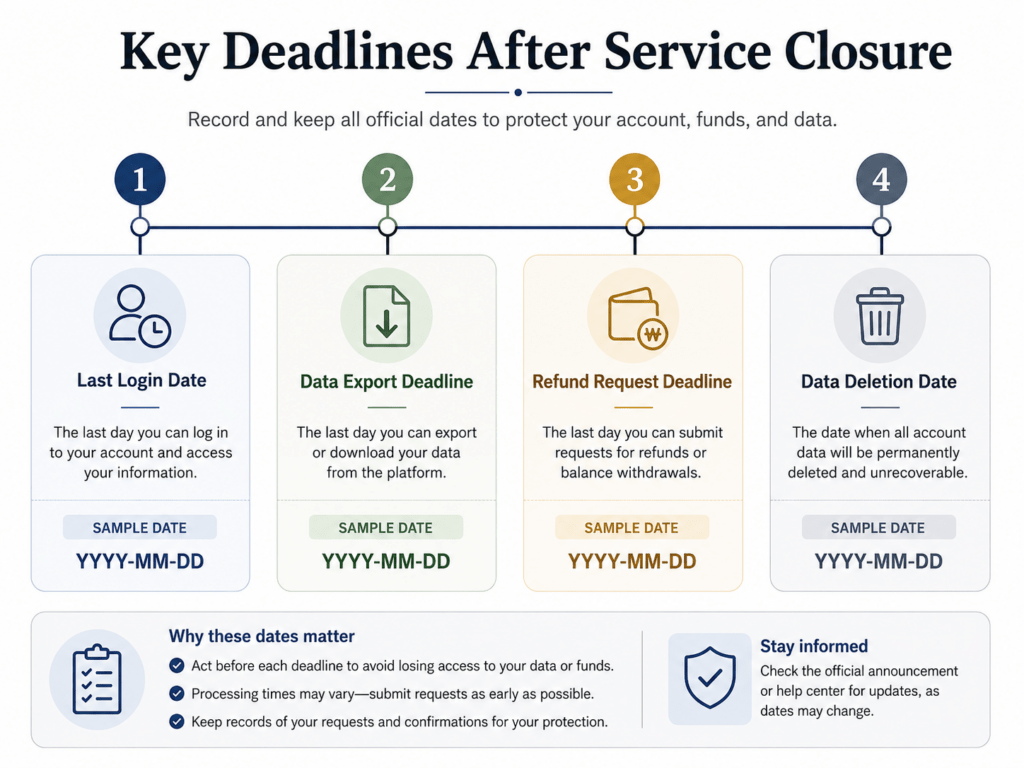
| Item | Date to confirm |
|---|---|
| Final date for normal service use | Verify in the shutdown notice |
| Final date for account login | Verify separately |
| Data-export request deadline | Verify separately |
| Subscription cancellation or refund deadline | Verify separately |
| Final date for downloading purchased or uploaded content | Verify separately |
| Planned account or data deletion date | Check the privacy notice |
Save a local copy of the shutdown notice and important emails. A bookmarked page may stop working after the regional website is removed, so store the documents outside the browser when possible.
Also confirm whether only the Korean service is closing or whether the entire account system is being discontinued. Some users may still be able to enter a global account page even after the Korean app stops operating. However, this should be verified through the official notice rather than assumed.
Save Account History, Payments, and Content Separately
A platform’s “download your data” function may not include everything you need. Treat personal information, payment records, and stored content as separate categories.
Account and Usage History
Open the profile, security, privacy, or data-management section and request an export if the platform provides one. Depending on the service, the archive may include account details, search records, viewing or listening history, ratings, messages, device information, purchase history, and details about uploaded content.
After downloading the archive, open it immediately to confirm that the files work, identify the period covered, and check whether any important activity is missing. Do not wait until the final day, as the export may contain only recent records or require an additional request.
Save the account email, username, account or membership number, subscription status, usage-history export, relevant device or login records, and the dates on which the export was requested and received in a separate location.
Complete this process before deleting the account. Account deletion may start a separate data-removal procedure and can make the normal export tools unavailable.
Subscription and Payment Records
Go to the billing or subscription section and save receipts, payment dates, transaction numbers, subscription periods, unused balances, cancellation confirmations, and refund notices.
Identify who actually collected the payment. The merchant may be the platform itself, an app store, a mobile carrier, or another billing company. A refund request sent to the platform may not resolve a charge processed by a different provider.
Do not assume that service closure automatically guarantees a full refund. The result can depend on the official shutdown plan, the remaining subscription period, the contract terms, and the company that processed the payment. Korean authorities have previously required digital-subscription businesses to correct terms that unfairly restricted cancellation or refunds, but an individual claim still needs to be assessed using the applicable agreement and transaction evidence.
Uploaded, Purchased, and Saved Content
Separate content you created from content you were merely licensed to access.
Uploaded photographs, documents, videos, posts, messages, or project files should be downloaded in their original format whenever possible. Confirm that attachments, metadata, comments, and folder structures are included if they matter.
Purchased media may not always mean permanent ownership of a downloadable file. Check whether the purchase provided an actual download or only access through the platform while its service and licensing system remained active.
Saved lists, playlists, bookmarks, and viewing progress may also require a separate export or manual record. Prioritize information that cannot easily be reconstructed elsewhere.
What to Do When Login or Data Export No Longer Works
If normal login no longer works, do not enter your password into unofficial mirror sites, third-party account-recovery services, or pages copied from the platform’s former Korean website. These pages may collect login credentials or payment information without providing any genuine access to the account.
Start by opening the platform’s official global account or privacy page. If that page remains active, use the official support form or email address to ask whether the account and its associated information are still retained. When the ordinary support channel cannot restore access, submit a formal request to view the personal information connected to the account. Payment records should be requested separately from the company that actually processed the subscription charge, such as the platform, an app store, a mobile carrier, or another billing provider. If the company does not respond or the dispute remains unresolved, consider the appropriate Korean privacy or consumer-support channel.
When contacting the company, provide enough information to identify the account without disclosing unnecessary sensitive data. Useful details may include the registered email address, username, country, approximate registration date, last successful login, subscription type, and relevant transaction numbers. The request should clearly identify the records needed. For example:
Please confirm whether personal information associated with this account is still retained and provide access to the available account, usage, and transaction records.
In Korea, individuals may request access to personal information and may also ask for its correction, deletion, or suspension of processing. A request can be submitted directly to the organization holding the information or through the Personal Information Portal. However, access or deletion may be restricted when another law requires the company to retain particular records or when another valid legal limitation applies.
The Personal Information Portal also provides routes for reporting privacy infringements and applying for dispute mediation. Official guidance identifies 118 as the privacy-infringement helpline and explains that mediation may be used when the user seeks compensation or another negotiated resolution.
For payment or refund problems, first contact the merchant or billing provider named on the receipt. When the matter cannot be resolved directly, Korea’s 1372 Consumer Counseling Center can provide an additional consumer-support route.
Before contacting an external organization, create one evidence folder containing the official shutdown notice, account-identification details, data-export requests and responses, receipts, transaction numbers, cancellation or refund confirmations, screenshots of error messages, and records of support communications. Organizing the evidence in one place makes it easier to show whether the issue concerns personal information, payment, purchased content, or access to the account itself.
When a global platform leaves Korea, do not assume that losing access to the service means all account records have already disappeared. The account system, data-export tool, billing provider, and deletion schedule may continue under different deadlines.
The most reliable process is:
Confirm every official deadline → export account history → save payments and content separately → identify the actual billing provider → submit an official privacy request if login fails.
Act before the published deadlines, keep copies outside the platform, and use Korean privacy or consumer-support channels only after preserving the evidence needed to support the request.